Spring Montage: A Pastel Color Font for Impactful Designs
What Exactly Is Spring Montage?
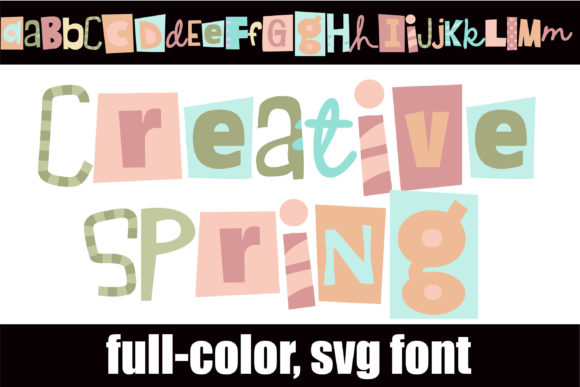
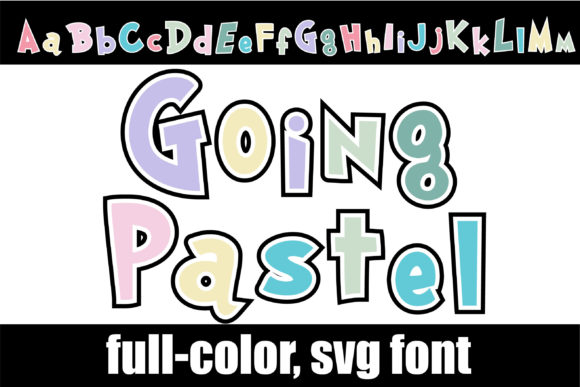
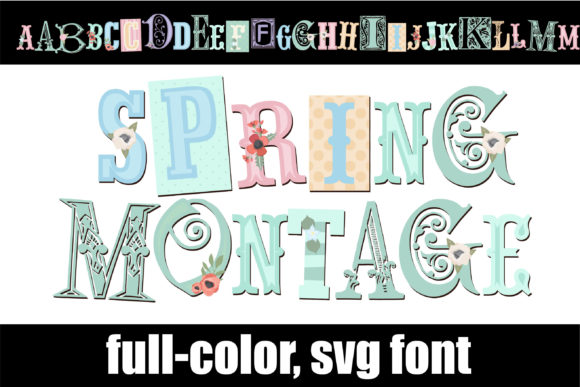
At its core, Spring Montage is a premium font that breaks away from the standard single-color typeface. It is technically classified as an OpenType-SVG color font. This means that unlike traditional fonts that require you to manually change colors in your design software, Spring Montage comes pre-rendered with a full-color palette. It features a montage of different lettering styles, all unified by a soft, pastel aesthetic. The result is a creative font that offers a rich, textured look right out of the box.
The visual personality of Spring Montage is defined by its simplicity combined with a strong visual effect. It does not rely on complex swashes or overly intricate details. Instead, it uses the variation in its letterforms—mixing different styles within the word—to create movement. The pastel color palette keeps the design approachable and gentle, making it an excellent choice for projects that need to feel friendly and modern without being aggressive. It serves as a bridge between a handwritten font and a display font, offering the casualness of hand lettering with the technical consistency of a digital typeface.
Unlocking the Full Potential with PUA Encoding
One of the most practical features of this typeface is that Spring Montage is PUA encoded. For designers and creators who are not deep into the weeds of typography software, PUA (Private Use Areas) encoding is a significant advantage. It ensures that every single glyph, swash, and ligature included in the font file is accessible. You do not need advanced design skills to access the hidden characters; you can typically view and select them through your system’s character map or a dedicated glyph panel in software like Adobe Illustrator or Photoshop.
This encoding makes the font incredibly versatile. You can easily swap out standard letters for stylistic alternates to ensure that adjacent characters don't look too repetitive—a common issue with display fonts. Whether you are working on logo design or social media graphics, having instant access to these variations allows you to customize the text to fit the specific space and tone of your project.
Practical Applications: Where This Font Shines
Choosing the right typeface often comes down to context. Spring Montage is not designed for long-form body copy, like the text in a novel or a technical manual. Its strength lies in headlines, titles, and short, impactful phrases. Here is where you can apply this color font effectively:
- Branding and Logo Design: If you are building a brand identity for a lifestyle brand, a bakery, a boutique, or a beauty service, this font conveys a sense of care and aesthetic awareness. It suggests that the brand pays attention to detail and values modern typography.
- Packaging Design: On physical products, especially in the health, wellness, or stationery sectors, the pastel colors and varied lettering can make a product stand out on a shelf. It adds a tactile, high-quality feel to the visual presentation.
- Digital Content and Web Design: For bloggers and content creators, using Spring Montage for featured images, Pinterest pins, or website headers can instantly grab attention. It breaks the monotony of standard sans serif font or serif font usage, providing a pop of personality.
- Editorial Design: In magazines or zines, particularly those focusing on fashion, art, or lifestyle, this typeface works well for pull quotes or section headers. It guides the reader's eye and adds a layer of visual storytelling.
- Wedding Stationery and Invitations: The soft pastel palette makes it a natural fit for wedding invitations, baby shower announcements, and greeting cards.
Technical Compatibility and Usage
It is vital to understand the technical specifications of Spring Montage to ensure it fits your workflow. Because this is an Opentype-SVG product, it behaves differently than a standard vector font. It contains actual image data within the font file to maintain the color and texture.
Compatibility: Spring Montage works seamlessly with professional design software including Adobe Photoshop, Adobe Illustrator, and Silhouette (Designer Edition or higher). It is also compatible with Inkscape. If you are a crafter using a Cricut machine, please note that the OTF and TTF files of this specific product are not compatible with Cricut Design Space, as the software does not support the complex color data required for SVG fonts.
Installation: Installation is the same as any other font on your operating system. Once installed, it appears in your font list. However, to see the colors, you must use an application that supports the OpenType-SVG standard.
Strategic Pairing and Hierarchy
When incorporating a display font like Spring Montage into a design, visual hierarchy is key. Because the font is visually dense and colorful, it pairs best with clean, neutral typefaces. Using it alongside a geometric sans serif font (like Montserrat or Lato) for your subheadings and body text creates a balanced composition. The contrast between the expressive, colorful header and the clean, readable body text ensures that your message is understood while still maintaining a unique aesthetic.
Consider the mood of your project. While Spring Montage fits well with pastel and light themes, it can also provide a striking contrast against dark, moody backgrounds. The pastel colors will pop against navy, charcoal, or black, creating a sophisticated yet playful vibe suitable for event flyers or social media ads.
Final Thoughts on Selection
When evaluating if Spring Montage is the right design asset for your collection, consider the longevity of your projects. If you frequently create content that requires a fresh, contemporary, and approachable look, a color font like this is a valuable tool. It reduces the time spent on manual coloring and kerning adjustments, allowing you to focus on the broader composition of your design.
Always test the font with your specific brand words or headlines before purchasing, if possible. Check how the ligatures interact with your specific letter combinations. For a comprehensive guide on how to utilize these types of fonts effectively, refer to the Ultimate Font Guide