Horror: The Color Font That Transforms Your Halloween Designs
Every October, designers and creators face the same challenge: making their work stand out in a sea of orange and black. We cycle through the same handful of spooky typefaces, searching for something that captures the eerie, playful spirit of the season without looking like every other invitation or social media post. This is where a tool like Horror changes the game. It’s not just another typeface; it’s a creative asset built for impact, designed to inject immediate personality into your projects.
What Exactly Is Horror?
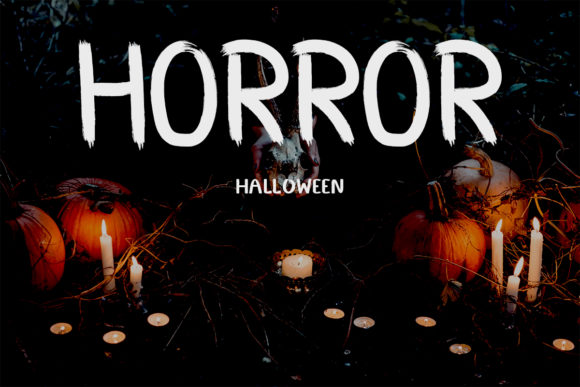
At its core, Horror is a premium font that belongs to a special category: color font. Officially known as an OpenType-SVG font, this technology allows the typeface itself to contain multi-color layers and texture directly within the font file. When you type with Horror, you’re not just getting outlines; you’re getting a pre-designed, textured graphic of each letter. The visual character of Horror is unmistakably spooky yet stylized. It evokes the classic horror movie title treatments of the mid-20th century, with a gritty, distressed texture that looks like it was scraped from a dusty crypt wall. The letters often feature a layered effect, perhaps with a dark base and a subtle highlight or crackle, giving them a three-dimensional, almost tactile quality. Its personality is bold, dramatic, and unapologetically thematic. This isn’t a font for body text; it’s a display font meant for headlines, logos, and moments that demand attention.
Practical Applications: Where Horror Shines
Understanding a font’s personality is one thing; knowing where to deploy it is where the real value lies. Horror’s strength is in applications where atmosphere and instant recognition are paramount. Think about logo design for a haunted attraction, a specialty bakery’s seasonal menu, or a podcast about true crime. The font immediately sets the tone. In editorial design, it’s perfect for the title of a Halloween magazine spread or a blog header about classic horror films. For packaging design, imagine the front of a craft beer label for a pumpkin ale or the wrapper for gourmet candy—Horror gives it an artisanal, thematic edge.
The digital space is where it truly excels. For social media graphics, a single word set in Horror can stop a scroll. It’s ideal for promoting a flash sale, announcing an event, or creating a series of themed Instagram stories. In web design, it can be used strategically for hero section titles on a seasonal landing page. For crafters and hobbyists, it’s a fantastic asset for creating custom t-shirts, tote bags, or vinyl decals for mugs and tumblers, thanks to its compatibility with design software like Illustrator and Silhouette Studio.
The Strategic Impact on Your Project
Choosing a typeface like Horror is a strategic decision that influences several key aspects of your design. First, it dramatically affects visual hierarchy. Its ornate, textured nature makes it impossible to ignore, naturally drawing the viewer’s eye to the most important message. This makes it an excellent tool for guiding a reader’s attention.
Second, it shapes brand perception. For a seasonal campaign or a niche brand, using Horror signals creativity, attention to theme, and a sense of fun. It helps build a brand identity that is memorable and specific. Consistency is key in branding, and having a distinctive font like this in your toolkit allows you to maintain a cohesive look across all your October marketing materials, from email headers to printable party invitations.
Third, it drives audience engagement. A well-placed, thematic font creates an emotional connection. It shows your audience that you’ve put thought into the aesthetic, which can increase dwell time on a page, improve click-through rates, and make your content more shareable. It transforms a simple announcement into an experience.
Smart Implementation: A Designer’s Checklist
Before you dive in, a practical approach will ensure you get the most out of this creative font. Here’s how to evaluate and use it effectively:
- Evaluate Project Fit: Is the project’s tone playful-spooky, gothic, or whimsical? Horror leans into a classic, gritty horror aesthetic. Ensure it aligns with your specific vibe rather than forcing it into a mismatched context.
- Master Font Pairing: This is crucial. Because Horror is so textured and bold, pair it with a clean, simple sans serif font or a serif font for body text. A pairing like Horror for headlines with a font like Montserrat or Lora for paragraphs creates a balanced, readable design where the display font pops without overwhelming the page.
- Review the Included Styles: A good premium font family often includes alternates, ligatures, or extra glyphs. Check what’s included. These extras can add variety and a more hand-crafted feel to your lettering.
- Test Readability Thoroughly: At small sizes, intricate textures can become muddy. Always test your design at the intended output size. Horror is best used at larger point sizes where its details can be appreciated. Avoid using it for long sentences or paragraphs.
- Understand the Licensing: For entrepreneurs and small business owners, commercial licensing is non-negotiable. Ensure the license you purchase covers your intended use, whether it’s for physical products, digital goods, or client work. Read the details—it’s a standard part of professional design work.
- Check Compatibility: Remember, this is an OpenType-SVG color font. It works seamlessly in modern versions of Adobe Photoshop, Illustrator, and other advanced design software. It is not compatible with Cricut Design Space directly, as that software doesn’t support color font technology. For Cricut users, you would need to convert the text to a standard path in a compatible program first.
In the end, Horror is more than just a spooky typeface. It’s a focused design solution. When used thoughtfully, it elevates your work from merely themed to genuinely compelling, giving your October creations the standout quality they deserve. It’s a testament to how the right design asset can streamline your workflow and amplify your creative vision.