Wigglebop: Adding Playful Personality to Your Creative Projects
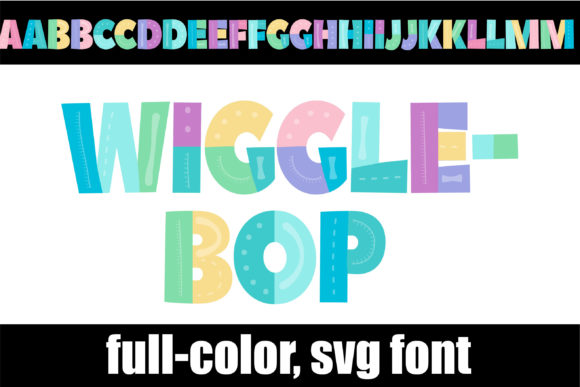
Sometimes a design needs more than just letters—it needs a voice. That's exactly what Wigglebop delivers. This full-color display font brings chunky, pastel-colored lettering to the table, and honestly, it's hard to look at without smiling. If you've been searching for a creative font that breaks away from the usual black-and-white typefaces, Wigglebop might be exactly what your next project calls for.
At its core, Wigglebop is an OpenType-SVG color font. That means each character arrives with built-in color and shading, so you're not just typing words—you're placing vibrant, illustrated letters directly into your designs. The pastel palette feels fresh and approachable, while the chunky letterforms keep everything readable and grounded. It's playful without being childish, decorative without sacrificing clarity. That balance is surprisingly rare in the world of display fonts.
Where Wigglebop Truly Shines
Think about projects where personality and visual impact matter most. Wigglebop works beautifully as a headline font for posters, event flyers, and social media graphics. Its colorful nature immediately draws the eye, making it a strong choice for Instagram stories, YouTube thumbnails, and Pinterest pins where you're competing for attention in a crowded feed.
For entrepreneurs and small business owners, this font can inject real character into brand identity work—especially for brands that want to feel approachable, fun, or creative. Children's party invitations, bakery logos, boutique packaging design, and playful web design headers all benefit from Wigglebop's distinctive look. Bloggers and content creators working in lifestyle, parenting, food, or craft niches will find it pairs well with their visual storytelling style.
That said, context matters. Wigglebop isn't the right fit for a corporate law firm's annual report or a luxury watch brand's editorial design. It knows what it is, and that's a strength. The best use of any premium font happens when the designer understands the font's personality and matches it to a project that shares that energy.
Understanding the Technical Side
Before you commit to Wigglebop for a project, it's worth knowing how color fonts work under the hood. Because this is an OpenType-SVG typeface, it carries actual image data within each glyph. That's what gives the letters their rich, multi-toned appearance. However, this also means compatibility is a real consideration.
Wigglebop plays nicely with Photoshop, Illustrator, Silhouette, and Inkscape. If you're working in those applications, you'll have full access to the font's capabilities, including its PUA-encoded glyphs and ligatures. These extra characters give you design flexibility—swapping in alternate letterforms, decorative connections, or stylistic variations that keep your typography feeling dynamic rather than repetitive.
One important note: the OTF and TTF files included with Wigglebop are not compatible with Cricut machines. If you're a crafter who relies on Cricut for cutting projects, you'll need to work around this limitation—perhaps by converting text to outlines in Illustrator first or exploring other workarounds. Checking the Ultimate Font Guide from the developer is a smart move if you're new to working with color fonts or need troubleshooting help.
Pairing Wigglebop with Other Fonts
Good design rarely relies on a single typeface. Font pairing is where the real craft comes in, and Wigglebop opens up some interesting possibilities. Because it's bold, colorful, and highly decorative, it works best alongside simpler companions. A clean sans serif font for body text creates a natural contrast—something like a geometric or humanist sans serif that doesn't compete for attention but still holds its own on the page.
A classic serif font can also work in certain editorial contexts, particularly when you want a mix of modern typography with a touch of traditional structure. The key principle is restraint. Let Wigglebop own the headlines and hero text, then step back with something quieter for supporting copy. Script fonts and handwritten fonts can occasionally complement Wigglebop if you're careful about visual weight, but stacking multiple decorative typefaces together usually creates clutter rather than harmony.
Practical Tips for Getting the Most Out of Wigglebop
Start by reviewing all the included styles and glyph variations. PUA encoding means those alternates are accessible even in design software that doesn't natively support advanced OpenType features. Take time to explore what's available before settling on your final layout. Sometimes a simple ligature swap or alternate character can elevate a headline from good to memorable.
Test your designs at actual size and on actual screens or print materials. A font that looks stunning at 120 pixels on your monitor might lose its charm at 40 pixels on a mobile screen. Wigglebop's chunky letterforms generally hold up well at moderate sizes, but like any display font, it's not designed for long paragraphs or fine print. Use it strategically—headlines, logos, pull quotes, call-to-action buttons—places where its personality can breathe.
For commercial projects, always verify the licensing terms. Whether you're designing client work, selling products with the font embedded, or creating merchandise, understanding what the license covers protects both you and your clients. Most premium font licenses distinguish between desktop use, web use, and embedding rights, so read the fine print.
Bringing It All Together
Wigglebop isn't trying to be everything. It's a specific tool for specific moments—those times when a design needs warmth, color, and a sense of fun. Used thoughtfully, it becomes a genuine asset in your design toolkit. Pair it wisely, deploy it in the right context, and let its pastel personality do what it does best: make people pay attention.
For designers, marketers, and creators who want their work to feel distinctive without overcomplicating things, Wigglebop offers a straightforward solution. It's one of those design assets that, once you understand its strengths, you'll keep reaching for whenever a project asks for something with a little more life in it.