Papa Papa: A Vibrant Choice for Modern Creatives
Understanding the Papa Papa Typeface
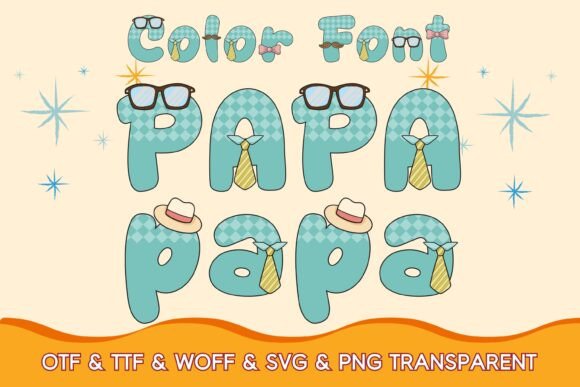
In a landscape dominated by standard sans serif font families and traditional serif font options, finding a typeface with genuine personality can feel like searching for a needle in a haystack. Papa Papa enters the market not as a subtle text font, but as a bold, colorful display font designed to capture immediate attention. This is a premium font that leverages modern typography technology—specifically OpenType-SVG—to bring full-color gradients and textures directly into the letterforms.
Unlike standard vector fonts where you apply a stroke or fill in your design software, Papa Papa arrives with its shading, lighting, and color baked into the characters. The visual style is distinct; it carries a fun, energetic, and slightly retro vibe that feels familiar yet fresh. It avoids the stiffness of corporate typefaces, leaning instead toward a playful aesthetic that works well for branding that needs to feel approachable and human. Whether you view it as a creative font for personal projects or a commercial font for client work, its defining trait is its ability to look "finished" the moment you type it out.
Visual Personality and Design Characteristics
When evaluating a display font like Papa Papa, the first thing to note is its visual weight. This typeface is designed to be a headline grabber. It is not a script font or a handwritten font, though it possesses a certain organic quality in its coloring. The characters typically feature solid fills with highlights and shadows that mimic three-dimensional effects or textured surfaces.
The personality of Papa Papa is undeniably extroverted. It works best in scenarios where you want the typography to act as the primary graphic element. For example, in logo design, a standard sans serif might require an accompanying icon to create interest. With Papa Papa, the text itself becomes the icon. The "cool and original-looking" nature of the font means it carries a heavy visual load, which is perfect for short, punchy statements. It communicates energy, creativity, and a willingness to break away from the norm.
Practical Applications: From Digital to Print
The versatility of a color font is often debated, but Papa Papa finds its niche in specific, high-impact areas. As a designer or business owner, knowing where to deploy this asset is key to getting the most value out of it.
Digital Design and Social Media
For content creators and social media managers, grabbing attention in a crowded feed is the primary challenge. Papa Papa excels here. It is an excellent choice for Instagram stories, YouTube thumbnails, and Pinterest graphics. Because the font includes color and texture, it reduces the need for heavy post-processing. You can type out a headline for a blog post or a podcast cover, and the typography immediately looks professional and stylized. In the realm of web design, it is best used sparingly—perhaps for a hero section headline or a promotional banner—rather than for body copy, where its complex rendering might slow down load times or reduce legibility at smaller sizes.
Branding and Packaging
When it comes to brand identity, consistency is everything. If your brand voice is playful, energetic, or retro, Papa Papa can serve as a cornerstone of your visual language. It is particularly effective for packaging design. Imagine a coffee bag, a box of artisanal chocolates, or a line of children's toys; a font like Papa Papa can instantly convey the product's vibe without needing extensive illustration. For entrepreneurs and small business owners, this font can help create a distinct shelf presence that separates their products from competitors using generic typography.
Crafts and Personal Projects
While the professional applications are vast, the font is also a favorite among hobbyists. For greeting cards, invitations, or scrapbooking, Papa Papa provides that "handmade" look with the precision of digital text. It is particularly useful for physical products like stickers or t-shirts where the design needs to be vibrant and eye-catching. However, crafters must pay close attention to the file formats included with the product to ensure compatibility with their specific cutting machines or software.
Technical Considerations and Compatibility
One of the most critical aspects of working with a premium font like Papa Papa is understanding its technical requirements. Because this is an OpenType-SVG (Color Font), it behaves differently than a standard TTF or OTF file.
First, you must ensure your software supports this technology. Papa Papa is compatible with recent versions of Photoshop, Illustrator, Silhouette Studio (Designer Edition or higher), and Inkscape. These programs can read the embedded SVG data that renders the colors.
Important Note on Cutting Machines: A common point of confusion for crafters involves Cricut machines. The standard OTF or TTF files of Papa Papa are not compatible with Cricut Design Space as color fonts. Cricut software generally cannot process the SVG data inside the font file to produce a multi-color cut. Instead, users must utilize the separate SVG and high-resolution PNG files provided with the purchase. These standalone files allow you to import the letters as images, which can then be sized to a dazzling 300px (or larger, depending on the resolution provided) and used for print-and-cut projects.
Strategic Use: Readability and Hierarchy
As a design professional, I often see creatives get excited about a new creative font and overuse it. With Papa Papa, restraint is the key to success.
Visual Hierarchy: This font demands to be at the top of the hierarchy. Use it for H1 headings, pull quotes, or hero text. Do not use it for body copy. The complexity of the color and texture makes it difficult to read in long paragraphs, and the file size of color fonts can impact performance if used excessively.
Font Pairing: Because Papa Papa is so expressive, it pairs best with neutral, clean companions. A simple sans serif font (like Helvetica, Roboto, or Open Sans) or a traditional serif font works perfectly for the body text. This contrast allows the headers to pop while ensuring the rest of the content remains legible and professional. Avoid pairing it with other ornate script fonts or handwritten fonts, as this will create visual chaos.
Evaluating the Investment
When you purchase a commercial font, you are buying a design asset that saves time and elevates quality. Papa Papa offers significant value because it includes multiple formats. You aren't just getting a font file; you are getting a toolkit.
The inclusion of SVG and PNG files is a major advantage. It means you don't need to be a master of vector software to use the font effectively. You can drag and drop the PNG images into your designs. For those using Silhouette or Illustrator, the vector capabilities allow you to scale the design infinitely without losing quality.
Before finalizing a design, always test the font at the specific size it will be viewed. A display font that looks great on a 27-inch monitor might look muddy on a mobile screen if the details are too fine. Fortunately, Papa Papa is designed with bold strokes and high contrast, making it generally robust across different viewing environments.
Conclusion
Papa Papa is more than just a collection of colorful letters; it is a design solution for anyone looking to inject personality into their work. Whether you are a marketer designing a campaign, a blogger creating a header image, or a crafter making a personalized gift, this font provides a shortcut to professional, vibrant aesthetics. By understanding its technical requirements and using it within the right context, you can transform your designs from standard to mesmerizing. It stands as a testament to how modern typography can bridge the gap between digital precision and artistic flair.